Book Social Network
1. High-Level Architecture
BSN is a classic 3-tier system: an Angular SPA on the presentation tier, a Spring Boot REST API on the application tier, and PostgreSQL on the data tier. The frontend never talks to the database directly — every call goes through the API with a Bearer JWT injected by an HTTP interceptor.
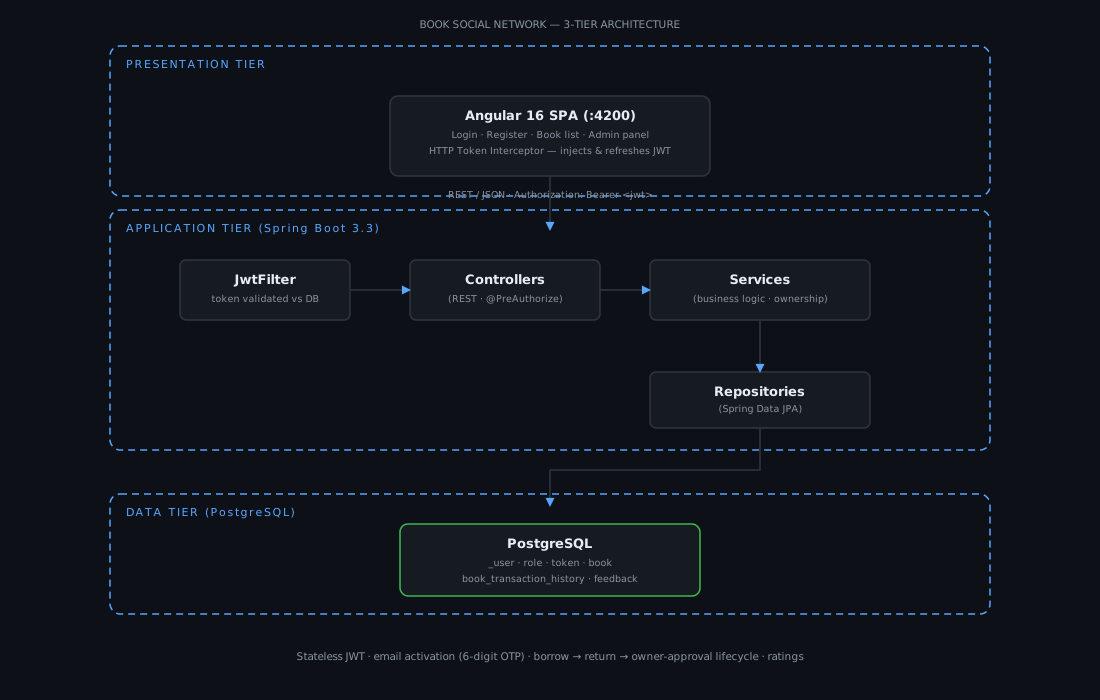
- Request flow. Every request passes through
JwtFilter, which extracts the token, verifies it against the database (not just the signature), and populatesSecurityContextbefore the controller runs. - Session-free security. The API is stateless (
SessionCreationPolicy.STATELESS) with CSRF disabled — authentication is purely JWT-driven, so the API scales horizontally without sticky sessions. - Async email. Account activation emails are sent on a background thread, so the register endpoint does not block on SMTP.
2. Project Overview & Context
The Problem. Sharing books should be easy, but there is no frictionless way for a community to share physical collections — people buy books that then sit on shelves, and there is no structured borrow/return process with accountability.
The Goal. Build a full-stack platform where users register (with email verification), list their books as shareable, borrow books from others, and complete a borrow → return → owner-approval lifecycle — with feedback and ratings to build trust, and an admin panel for account governance.
3. Core Backend Logic & Features
Role-Based Access Control (RBAC)
USER and ADMIN roles via a user_roles many-to-many join. @EnableMethodSecurity(securedEnabled = true) enables @PreAuthorize("hasAuthority('ADMIN')") on user-management endpoints (list users, lock/unlock, enable/disable), while book and feedback operations are guarded by ownership checks in the service layer (book.getOwner().getId().equals(currentUser.getId())), which prevents a user from mutating someone else's books.
Business logic — the borrow/return state machine
A borrow is a row in book_transaction_history tracked by two booleans: returned and returnApproved. The lifecycle is enforced in BookServiceImpl:
- Borrow — four validation layers: the book must be
shareableand notarchived; self-borrow is forbidden; the requesting user must not already hold it; and no one else may currently hold it. - Return — the borrower flips
returned = true. - Approve — only the owner can flip
returnApproved = true, which frees the book for the next borrower.
This keeps "currently borrowed" state derivable from the history table without a separate status column.
Security & auth
- Email-activated registration. Signup hashes the password with BCrypt, stores the user disabled, and sends a 6-digit OTP (SecureRandom, 15-minute expiry, rendered via Thymeleaf) for
GET /auth/activate-account?token=…. - JWT pair. 24-hour access token carrying
fullName+authorities, and a rotating refresh token. Login revokes all previous tokens, and the refresh endpoint rotates to a new pair. - Server-side token validation.
JwtFilterre-checks the token row in the database (expired = false AND revoked = false), so a revoked token dies immediately even if its signature is still valid.
4. Database & Data Modeling
Database choice. PostgreSQL for the relational integrity the borrow/return history demands (audited transactions that must never be lost), with JPA handling the schema (ddl-auto: update in dev).
Key relationships (ERD highlights):
| Relation | Cardinality | Note |
|---|---|---|
| User ↔ Role | M:N | join table user_roles |
| User → Token | 1:N | access + refresh tokens persisted |
| Book → User (owner) | N:1 | owner_id |
| Book → Feedback | 1:N | ratings derived from Feedback.note |
| Book → BookTransactionHistory | 1:N | borrow/return rows |
| BookTransactionHistory → User | N:1 | the borrower |
Performance strategy.
- Pagination on every list endpoint via
Pageable+ a genericPageResponse<T>— no endpoint returns an unbounded array. - Dynamic queries at the DB level, not in memory:
findAllDisplayableBooks,findAllBorrowedBooks,findAllReturnedBooks, andSELECT (COUNT(*) > 0)checks for "already borrowed" — all parameterized JPQL. - Specifications (
JpaSpecificationExecutor) for the "my books" filter, so criteria compose cleanly. - Fetch discipline — roles are EAGER with
@Transactionalon user loading to avoidLazyInitializationException, and audit fields come from Spring Data Auditing instead of manual timestamps.
5. Tech Stack & Engineering Trade-offs
| Concern | Choice |
|---|---|
| Backend | Java 17 + Spring Boot 3.3 |
| Frontend | Angular 16 |
| Persistence | PostgreSQL 14 + Spring Data JPA |
| Auth | JJWT 0.11.5 (access + refresh) |
| Spring Mail + Thymeleaf templates (MailDev in dev) | |
| API docs | SpringDoc OpenAPI |
| Container | Docker Compose |
Trade-off decisions.
- JWT over server sessions. Stateless auth lets the API scale horizontally and keeps the Angular SPA decoupled; the cost is that token revocation must be handled manually — solved by persisting tokens and checking them in
JwtFilter. - A history table with two booleans instead of an enum status column. The lifecycle (borrowed → returned → approved) reads as plain data, is auditable, and avoids migrating a status enum; the trade-off is that every "is this book free?" question becomes a
COUNTquery — kept cheap with a count-only JPQL. - Angular + stateless API over a server-rendered app. Clear separation of concerns for a team of one, at the cost of two build pipelines to maintain.
6. Engineering Challenges & Solutions
The Challenge — enforcing a borrow-return lifecycle without a status column. A naive implementation would let two users borrow the same book, or let a borrower return a book to the wrong owner.
The Solution. Multi-layer validation in BookServiceImpl: self-borrow detection, duplicate-borrow checks for the current user and other users, ownership checks on return-approval, and transactional writes so a borrow either fully commits or rolls back. The two-boolean state machine made the whole flow verifiable from a single history table.
The Challenge — race condition on "is this book free?" The check-then-insert borrow flow (query, then insert) has a window where two parallel requests could both pass validation.
The Solution. The codebase flags this explicitly — a @Lock(PESSIMISTIC_WRITE) on the borrow query or a unique constraint on active transactions is the documented hardening step. This is a good example of shipping a correct-in-the-happy-path feature and noting exactly where to lock it down under load.
The Challenge — token security and lifecycle hygiene. Revoked or expired tokens must not be accepted even if the JWT signature is valid.
The Solution. Tokens are persisted and checked server-side in JwtFilter (valid + not revoked), login revokes all prior tokens before issuing a new pair, and refresh tokens rotate. For OTPs, SecureRandom (not Math.random) guarantees unpredictable activation codes.
Honest limitations. Cover images are re-read from disk on every request (I/O in the mapper), and refresh-token generation mixes two strategies in the codebase (JWT vs UUID). Both are noted in the repo as refactor targets — the UUID approach (a database-backed opaque token) is the more consistent one.
7. Deployment & Configuration
BSN's configuration is split between Docker Compose for the infrastructure dependencies and Spring profiles + environment variables for the application. The backend runs locally through Maven (no app Dockerfile or CI pipeline yet), and a small shell script wires up the environment.
docker-compose.yml — infrastructure only
services:
  postgres:
    container_name: postgres-sql-bsn
    image: postgres
    environment:
      POSTGRES_USER: username
      POSTGRES_PASSWORD: password
      PGDATA: /var/lib/postgresql/data
      POSTGRES_DB: book_social_network
    volumes:
      - postgres:/data/postgres
    ports:
      - 5432:5432
    networks:
      - spring-demo
    restart: unless-stopped

  mail-dev:
    container_name: mail-dev-bsn
    image: maildev/maildev
    ports:
      - 1080:1080
      - 1025:1025

networks:
  spring-demo:
    driver: bridge
volumes:
  postgres:
    driver: local
Provides the two services the app depends on: PostgreSQL (:5432) and MailDev — which catches all outgoing email at SMTP :1025 and shows it in a web UI at :1080, perfect for testing the OTP activation flow without a real provider.
.env.example — all environment variables
# ==========================================
# Book Social Network - Environment Variables
# ==========================================
# Copy this file to .env and fill in your values
# NEVER commit .env to version control!

# PostgreSQL
DB_URL=jdbc:postgresql://localhost:5432/book_social_network
DB_USERNAME=username
DB_PASSWORD=password

# JWT
JWT_SECRET_KEY=404E635266556A586E3272357538782F413F4428472B4B6250645367566B5970
JWT_EXPIRATION=86400000
JWT_REFRESH_EXPIRATION=604800000

# Mail (MailDev)
MAIL_HOST=localhost
MAIL_PORT=1025
MAIL_USERNAME=endos
MAIL_PASSWORD=endos

# Frontend
ACTIVATION_URL=http://localhost:4200/activate-account
Copy it to .env, fill in real values, and every secret flows into Spring via ${...} placeholders — nothing sensitive lives in source control.
run.sh — dev launcher
#!/bin/bash
# ==========================================
# Book Social Network - Dev Runner
# Loads .env file and starts Spring Boot
# ==========================================

SCRIPT_DIR="$(cd "$(dirname "${BASH_SOURCE[0]}")" && pwd)"
ENV_FILE="$SCRIPT_DIR/.env"

if [ -f "$ENV_FILE" ]; then
    echo "Loading environment from $ENV_FILE"
    set -a
    source "$ENV_FILE"
    set +a
else
    echo "WARNING: .env file not found at $ENV_FILE"
    echo "Copy .env.example to .env and fill in your values"
    exit 1
fi

echo "Starting Book Social Network API..."
cd "$SCRIPT_DIR/book-network"
./mvnw spring-boot:run
Exports .env into the shell (set -a … set +a) and boots the API with ./mvnw spring-boot:run.
book-network/src/main/resources/application.yml — base
spring:
  profiles:
    active: dev
  servlet:
    multipart:
      max-file-size: 50MB
springdoc:
  default-produces-media-type: application/json
  swagger-ui:
    url: /api/v1/v3/api-docs
    config-url: /api/v1/v3/api-docs/swagger-config
server:
  servlet:
    context-path: /api/v1/
Sets dev as the default profile, allows book-cover uploads up to 50MB, and mounts the whole API under /api/v1/.
book-network/src/main/resources/application-dev.yml — dev profile
spring:
  datasource:
    url: ${DB_URL:jdbc:postgresql://localhost:5432/book_social_network}
    username: ${DB_USERNAME:username}
    password: ${DB_PASSWORD:password}
    driver-class-name: org.postgresql.Driver
  jpa:
    hibernate:
      ddl-auto: update
    show-sql: false
    properties:
      hibernate:
        format_sql: true
    database: postgresql
    database-platform: org.hibernate.dialect.PostgreSQLDialect
  mail:
    host: ${MAIL_HOST:localhost}
    port: ${MAIL_PORT:1025}
    username: ${MAIL_USERNAME:endos}
    password: ${MAIL_PASSWORD:endos}
    properties:
      mail:
        smtp:
          trust: "*"
        auth: true
        starttls:
          enabled: true
        connectiontimeout: 5000
        timeout: 3000
        writetimeout: 5000
application:
  security:
    jwt:
      secret-key: ${JWT_SECRET_KEY:change_me_in_production}
      expiration: ${JWT_EXPIRATION:86400000}
      refresh-token:
        expiration: ${JWT_REFRESH_EXPIRATION:604800000}
  mailing:
    frontend:
      activation-url: ${ACTIVATION_URL:http://localhost:4200/activate-account}
  file:
    uploads:
      photos-output-path: ./uploads
server:
  port: 8088
Every sensitive value is overridable via environment variables (DB_URL, JWT_SECRET_KEY, JWT_EXPIRATION, JWT_REFRESH_EXPIRATION, ACTIVATION_URL, MAIL_HOST, MAIL_PORT), so the same jar runs unchanged in any environment. ddl-auto: update keeps dev friction low; a migration tool (Flyway/Liquibase) is the documented production upgrade.