Store API
1. High-Level Architecture
Store is a single Spring Boot application serving two interfaces from the same domain model: a Thymeleaf server-rendered UI for browser users and a JSON REST API for programmatic clients. A smart image-storage layer sits between the app and its storage backends, and the whole thing ships as a multi-profile deployable.
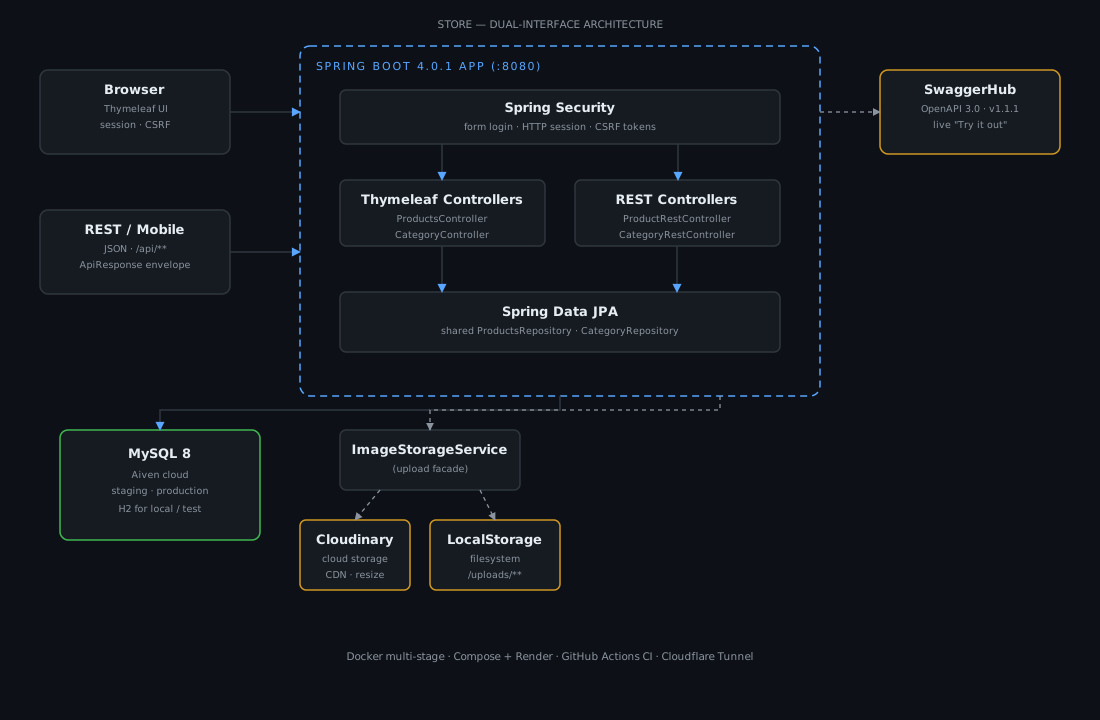
- Request flow. Browser users authenticate with Spring Security form login (HTTP session + CSRF tokens) and are served Thymeleaf templates. API clients hit
/api/**and get a uniform{ success, message, data }envelope. - Security boundary placement. Role checks (
ADMINvsUSER) are enforced by Spring Security's URL matchers before a controller runs; the UI additionally hides admin actions viasec:authorize. - Storage resilience.
ImageStorageServicetries Cloudinary first and falls back to the local filesystem on any failure, so an outage of the cloud provider never breaks an upload.
2. Project Overview & Context
The Problem. Product and category data lived without a proper interface — browsing, editing, and integrating with the data was manual and had no permission model, and there was no way to test against a live, documented API.
The Goal. Build a full-stack product & category management application with two clean access paths (browser UI + REST API), role-based authentication, image upload, a versioned OpenAPI spec usable from SwaggerHub, and environment-aware configuration for local, dev, staging, and production.
3. Core Backend Logic & Features
Role-Based Access Control (RBAC)
Two in-memory roles — ADMIN (full CRUD) and USER (read-only). The matrix is enforced by URL matching in SecurityConfig:
| Route | Access |
|---|---|
/login, /api/**, /swagger-ui/**, /v3/api-docs/**, /uploads/** | open |
/categories/** | ADMIN |
POST/GET /products/create, /products/edit, /products/delete | ADMIN |
GET /products, / | any authenticated user |
CSRF protection stays enabled for the session-based MVC UI (Thymeleaf injects tokens into forms) and is scoped off only for /api/** and the H2 console.
Business logic
- Dual interface, one model.
ProductsController(Thymeleaf) andProductRestController(/api/products) share the same repository and the same case-insensitive search — a single derived queryfindByNameContainingIgnoreCaseOrBrandContainingIgnoreCasepowers both the browser search box and the API's?search=parameter. - Image upload with failover. Multipart uploads go through
ImageStorageService, which routes to Cloudinary when configured, else local disk (/uploads/...). Delete is storage-aware: it inspects the URL prefix to decide which backend to call. - Unified API envelope. Every REST endpoint returns
ApiResponse<T>(success,message,data) withok()/error()factories, giving clients a predictable contract.
Security & auth
- Form login + session with a custom
/loginpage,defaultSuccessUrl("/products"), and demo-account quick-fill buttons. - Role enforcement at the edge (URL matchers) plus UI-level guards, so
USERnever even sees the create/edit/delete actions. - Production posture —
open-in-view: falsekeeps database connections from being held open across the view-rendering phase, and dedicated error pages (403/404/500) prevent stack traces from leaking.
4. Database & Data Modeling
Database choice. MySQL 8 in the cloud (Aiven) for staging/production — a battle-tested relational store for CRUD workloads — with H2 in-memory for instant local/test spins. The application is fully environment-driven through four Spring profiles that swap only the datasource and seed data.
Key relationships (ERD highlights):
| Relation | Cardinality | Note |
|---|---|---|
| Category → Product | 1:N | products.category_id |
| Product → Category | N:1 | unidirectional; no cascade |
Deleting a category leaves its products with category_id = null ("uncategorized") rather than cascading deletes — a deliberate safety choice so product data is never destroyed accidentally.
Performance strategy.
- Deterministic ordering (
Sort.by(...).ascending()) so list responses are stable for clients and pagination-friendly consumers. - Parameterized LIKE search (Spring Data derived query) — safe from SQL injection by construction.
open-in-view: false— prevents accidental N+1-style lazy loading and long-held connections during view rendering.
Honest note. List endpoints return full collections rather than paged responses, and
name/brandhave no dedicated index (theLIKE '%…%'search is inherently unscannable by a B-tree). For the catalog sizes this serves, that is fine — and both are the first optimizations I would apply at scale.
5. Tech Stack & Engineering Trade-offs
| Concern | Choice |
|---|---|
| Framework | Spring Boot 4.0.1 (Java 17) |
| Security | Spring Security 7.0.2 |
| Template | Thymeleaf 3.1.3 |
| Persistence | MySQL 8 / H2 + Spring Data JPA |
| API docs | SpringDoc OpenAPI 2.8.4 + SwaggerHub |
| Images | Cloudinary + local filesystem fallback |
| Config | spring-dotenv + 5 Spring profiles |
| Deploy | Multi-stage Docker, Compose, Render, GitHub Actions |
Trade-off decisions.
- Spring Boot + Thymeleaf for the admin UI instead of a separate frontend build. For an internal management tool, server-rendered pages are simpler, render instantly, and avoid the overhead of a second pipeline — while the REST API still exists for anyone who wants a headless integration.
- Form login + session over JWT here. For a browser-first admin app behind a single origin, sessions with CSRF are the idiomatic, harder-to-misuse choice; JWT would only add revocation complexity without a mobile/SPA client to justify it.
- Cloudinary with a local fallback over self-hosted storage. Cloud storage offloads CDN/resizing concerns, but vendor dependence is risky — the fallback is the safety net that makes uploads never fail silently.
- Multi-profile configuration over one big config file. Secrets and URLs live in environment-specific YAML +
.env, so a single artifact deploys to local, staging, and production untouched.
6. Engineering Challenges & Solutions
The Challenge — making uploads survive a cloud-provider outage. If Cloudinary is down or unconfigured, uploads should still work — but the failure mode must be invisible to users.
The Solution. The ImageStorageService facade checks cloudinaryService.isAvailable() at startup, attempts Cloudinary first, and catches the failure to fall back to LocalStorageService. CloudinaryConfig only creates the Cloudinary bean when credentials are present (@ConditionalOnProperty), and delete operations inspect the stored URL prefix to hit the correct backend. Result: storage is pluggable and resilient without touching controllers.
The Challenge — keeping two interfaces in sync. Thymeleaf pages and the REST API must behave identically (same search, same rules) without duplicating logic.
The Solution. Both layers share the repository and domain model; the only split is DTO/validation (a form ProductDTO for the UI vs a JSON ProductRequest for the API), and the response envelope standardizes what clients see. Search and validation live in exactly one place each.
The Challenge — environment drift between local and production. H2 locally, MySQL in the cloud — a wrong datasource config wastes hours.
The Solution. Strict profile separation (local/dev/staging/production/test) with datasource, seed data, and show-sql toggles per environment, plus a .env loader. The same build artifact ran in Docker Compose locally and on Render in production with zero code changes.
Honest limitations. The REST API is open (documented as such in this article's RBAC table — the role enforcement protects the UI), and demo credentials use
{noop}plaintext encoding for the demo experience. Both are intentional for this demo deployment and are the documented first items to change before production hardening.
7. Deployment & Configuration
Store is configured for five environments through Spring profiles and ships with a multi-stage Dockerfile, Docker Compose, a Render blueprint, and a GitHub Actions CI pipeline. Every profile below lives in the repo and can be copied verbatim.
src/main/resources/application.yml — default / production base
# ============================================
# APPLICATION CONFIGURATION (Default/Production)
# ============================================

spring:
  application:
    name: store

  datasource:
    driver-class-name: com.mysql.cj.jdbc.Driver
    url: ${PROD_DB_URL}
    username: ${PROD_DB_USER}
    password: ${PROD_DB_PASSWORD}

  jpa:
    hibernate:
      ddl-auto: update
    show-sql: true
    open-in-view: false

server:
  port: ${PORT:8080}

management:
  endpoints:
    web:
      exposure:
        include: health
  endpoint:
    health:
      show-details: when-authorized

cloudinary:
  cloud:
    name: ${CLOUDINARY_CLOUD_NAME:}
  api:
    key: ${CLOUDINARY_API_KEY:}
    secret: ${CLOUDINARY_API_SECRET:}

app:
  upload:
    dir: ${UPLOAD_DIR:uploads}
  openapi:
    title: ${APP_TITLE:Store API}
    version: ${APP_VERSION:1.0.0}
    description: ${APP_DESC:REST API untuk manajemen produk dan kategori}
    license: ${LICENSE_NAME:MIT}
    contact:
      name: ${CONTACT_NAME:Hend Wunga}
      email: ${CONTACT_EMAIL:hend@example.com}
    server:
      local: ${URL_LOCAL:http://localhost:8080}
      staging: ${URL_STAGING:https://staging-store.herokuapp.com}
      prod: ${URL_PROD:https://your-app.herokuapp.com}
Carries the production defaults: MySQL from PROD_DB_* env vars, open-in-view: false, Actuator health, and Cloudinary + OpenAPI metadata (title, version, servers) all driven by environment variables.
Profile: application-local.yml — H2 in-memory
# ============================================
# LOCAL DEVELOPMENT (H2 Database)
# ============================================

spring:
  datasource:
    url: jdbc:h2:mem:store_local;DB_CLOSE_DELAY=-1
    driver-class-name: org.h2.Driver
    username: sa
    password: ""

  jpa:
    hibernate:
      ddl-auto: update
    show-sql: false

  h2:
    console:
      enabled: true
      path: /h2-console
Zero-install local runs with an in-memory H2 and the console available at /h2-console.
Profile: application-dev.yml — local MySQL
# ============================================
# DEVELOPMENT SERVER (Local MySQL)
# ============================================

spring:
  datasource:
    url: ${DEV_DB_URL:jdbc:mysql://localhost:3306/store?useUnicode=true&characterEncoding=utf8}
    username: ${DEV_DB_USER:root}
    password: ${DEV_DB_PASSWORD:}
Connects to MySQL on localhost (the one spun up by docker-compose.yml), overridable via DEV_DB_URL/DEV_DB_USER/DEV_DB_PASSWORD.
Profile: application-staging.yml — Aiven MySQL + seed data
# ============================================
# STAGING SERVER - Database Dummy (Aiven MySQL)
# Staging credentials: see .env
# ============================================

spring:
  datasource:
    driver-class-name: com.mysql.cj.jdbc.Driver
    url: jdbc:mysql://store-staging-hendrowunga073-1e55.e.aivencloud.com:18066/defaultdb?sslMode=REQUIRED&useUnicode=true&characterEncoding=utf8
    username: avnadmin
    password: ${STAGING_DB_PASSWORD}

  jpa:
    hibernate:
      ddl-auto: update
    show-sql: true
    open-in-view: false
    defer-datasource-initialization: true

  sql:
    init:
      mode: always
      data-locations: classpath:data-staging.sql

server:
  port: ${PORT:8080}
Connects to a cloud Aiven MySQL with sslMode=REQUIRED, and seeds demo data (6 categories, 10 products) from data-staging.sql via sql.init.
Profile: application-production.yml — production (Render)
# ============================================
# PRODUCTION SERVER (Render → Aiven MySQL)
# Same database as staging for demo purposes
# ============================================

spring:
  datasource:
    driver-class-name: com.mysql.cj.jdbc.Driver
    url: jdbc:mysql://store-staging-hendrowunga073-1e55.e.aivencloud.com:18066/defaultdb?sslMode=REQUIRED&useUnicode=true&characterEncoding=utf8
    username: avnadmin
    password: ${STAGING_DB_PASSWORD}

  jpa:
    hibernate:
      ddl-auto: update
    show-sql: false
    open-in-view: false
    defer-datasource-initialization: true

  sql:
    init:
      mode: always
      data-locations: classpath:data-staging.sql

server:
  port: ${PORT:8080}
Identical datasource to staging for this demo deployment, with show-sql off and the same idempotent seed data.
Dockerfile — multi-stage build
FROM maven:3.9.6-eclipse-temurin-17 AS build
WORKDIR /app

COPY pom.xml .
RUN mvn dependency:go-offline --no-transfer-progress

COPY src ./src
RUN mvn clean package -DskipTests --no-transfer-progress

FROM eclipse-temurin:17-jre
WORKDIR /app

RUN groupadd --system --gid 1000 app && \
    useradd --system --gid app --uid 1000 --create-home app

COPY --from=build --chown=app:app /app/target/*.jar app.jar

USER app
EXPOSE 8080

ENTRYPOINT ["java", "-jar", "app.jar"]
Stage 1 compiles with dependency:go-offline for layer caching; stage 2 runs the jar as a non-root app user (uid 1000).
docker-compose.yml — full local stack
services:
  mysql:
    image: mysql:8.0
    container_name: store-mysql
    restart: unless-stopped
    environment:
      MYSQL_ROOT_PASSWORD: ${MYSQL_ROOT_PASSWORD:-rootpass}
      MYSQL_DATABASE: store
      MYSQL_USER: ${MYSQL_USER:-storeuser}
      MYSQL_PASSWORD: ${MYSQL_PASSWORD:-storepass}
    ports:
      - "3306:3306"
    volumes:
      - mysql-data:/var/lib/mysql
    healthcheck:
      test: ["CMD", "mysqladmin", "ping", "-h", "localhost"]
      interval: 10s
      timeout: 5s
      retries: 5

  app:
    build: .
    container_name: store-app
    restart: unless-stopped
    depends_on:
      mysql:
        condition: service_healthy
    environment:
      SPRING_PROFILES_ACTIVE: dev
      DEV_DB_URL: jdbc:mysql://mysql:3306/store?useUnicode=true&characterEncoding=utf8
      DEV_DB_USER: ${MYSQL_USER:-storeuser}
      DEV_DB_PASSWORD: ${MYSQL_PASSWORD:-storepass}
      CLOUDINARY_CLOUD_NAME: ${CLOUDINARY_CLOUD_NAME:-}
      CLOUDINARY_API_KEY: ${CLOUDINARY_API_KEY:-}
      CLOUDINARY_API_SECRET: ${CLOUDINARY_API_SECRET:-}
      PORT: 8080
    ports:
      - "8080:8080"

volumes:
  mysql-data:
mysql:8.0 gets a named volume + healthcheck; the app starts (depends_on: service_healthy) with the dev profile and forwards Cloudinary credentials from the host .env so uploads work unchanged.
render.yaml — Render blueprint
services:
  - type: web
    name: store-api
    runtime: java
    plan: free
    buildCommand: "./mvnw clean package -DskipTests"
    startCommand: "java -jar target/store-0.0.1-SNAPSHOT.jar"
    envVars:
      - key: SPRING_PROFILES_ACTIVE
        value: production
      - key: JAVA_VERSION
        value: "17"
      - key: STAGING_DB_PASSWORD
        sync: false
Free-tier web service blueprint: builds with Maven, starts the jar, activates production, and declares STAGING_DB_PASSWORD as a sync: false secret so the Aiven MySQL password never lands in git.
.github/workflows/ci.yml — build + DockerHub push
name: CI

on:
  push:
    branches: [main, master]
  pull_request:
    branches: [main, master]

jobs:
  build:
    runs-on: ubuntu-latest
    steps:
      - uses: actions/checkout@v4
      - name: Set up JDK 17
        uses: actions/setup-java@v4
        with:
          java-version: "17"
          distribution: "temurin"
          cache: maven
      - name: Build and test
        run: mvn verify --no-transfer-progress

  docker:
    if: github.ref == 'refs/heads/main' || github.ref == 'refs/heads/master'
    needs: build
    runs-on: ubuntu-latest
    steps:
      - uses: actions/checkout@v4
      - name: Set up Docker Buildx
        uses: docker/setup-buildx-action@v3
      - name: Log in to DockerHub
        uses: docker/login-action@v3
        with:
          username: ${{ secrets.DOCKER_USERNAME }}
          password: ${{ secrets.DOCKER_PASSWORD }}
      - name: Build and push
        uses: docker/build-push-action@v6
        with:
          context: .
          push: true
          tags: ${{ secrets.DOCKER_USERNAME }}/store:latest
          cache-from: type=gha
          cache-to: type=gha,mode=max
mvn verify runs on every push/PR; on main/master, Buildx (with gha cache) pushes username/store:latest to DockerHub using the DOCKER_USERNAME/DOCKER_PASSWORD secrets.